Black Void Character Sheet Handbook
The Alchemic Arts Black Void sheet keeps the character information you need during play in one browser-based workspace. It preserves the detail of the tabletop sheet while automating repetitive calculations and giving larger collections, especially skills and phenomena, room to remain usable. This guide explains what each part does and how the parts work together.
Alchemic Arts is officially endorsed by Black Void Games, the creator of Black Void.
Getting started and saving
Create a Black Void sheet from My Sheets, give it a recognizable name, and open it whenever you need to prepare or play. The sheet is tied to your account, so other users cannot reach it simply by guessing its address.
Editable fields are saved to your account when you use the sheet's Save control. You can also press Ctrl+S for a quick save; the shortcut saves the character instead of opening the browser's “Save page” dialog. Save after major edits and before leaving the page. Collapsible fieldsets let you close sections you are not using, which is especially helpful on smaller screens or once a character has accumulated many skills.
Mobile-responsive, user-focused design
The Black Void sheet is mobile responsive and adapts its layout for desktop, tablet, and phone screens. Fields and controls reflow to remain readable and usable at narrower widths, allowing you to manage a character at the table without needing a desktop-sized display.
The interface is designed with user experience in mind. Related information is grouped into collapsible sections, calculated values reduce repetitive bookkeeping, tooltips provide rules reminders near the fields they explain, and frequently used tools such as saving and dice rolling remain readily available. These choices are intended to keep attention on the character and the game rather than on navigating the application.
Character basics and identity
Character Basics holds the facts that identify the character at a glance: name, species, homeworld, occupation, physical details, and other campaign-facing information. Several labels include tooltips drawn from the rules. Hover over or focus a labeled field when you need a reminder without leaving the sheet.
Later sections provide space for the parts of a Black Void character that are not numbers. Record desires and motivations, dislikes, secrets, regrets, philosophy, principles, quirks, sayings, ancestry, enlightenment, background, and notable events. These fields are useful prompts during character creation and a running record of how the character changes during a campaign.
Traits, Speed, Health, and Sanity
The Traits section tracks Agility, Awareness, Stamina, Strength, Intellect, Persuasion, Presence, and Willpower. Enter the trait score and the sheet calculates the associated modifier. When a trait changes, totals that depend on it can be updated without redoing the arithmetic by hand.
Speed keeps movement values visible beside the core statistics. Health and Sanity each track current and total values. Their displayed status changes as the current value crosses the system's thresholds, giving you a quick description of the character's condition rather than leaving you to compare two numbers during a tense scene. Update current values as damage, healing, or sanity loss occurs; update totals only when the character's underlying capacity changes.

Regular and combat skills
The sheet separates regular skills from combat skills so social, exploratory, professional, and physical capabilities do not become lost among attack options. A skill total combines its ranks, selected trait modifier, and miscellaneous modifiers. Rank controls make incremental changes quick, while the trait selector lets you use the trait appropriate to the situation when the Arbiter calls for a different approach.
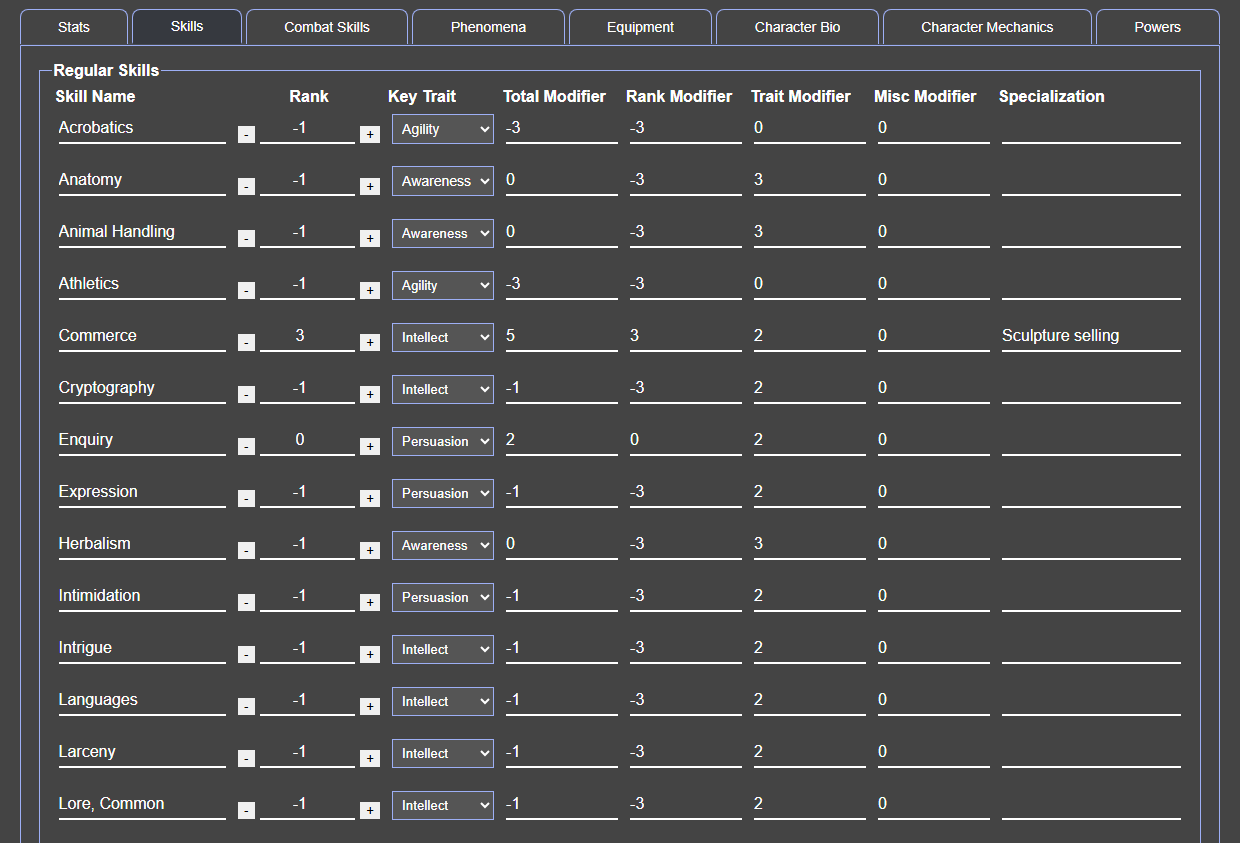
Combat skills use the same idea but keep weapon and fighting competencies together. As you improve a skill, adjust its ranks and any situational or equipment-based modifier; the calculated result remains the number you can take to the table. This makes it easier to audit a total because its contributing values remain visible instead of being flattened into one unexplained bonus.
Wealth, gear, story, and social details
Wealth and Gear provide open tracking for property, money, equipment, and supplies. They are intentionally flexible enough for the unusual resources and objects found across Llyhn and beyond.
The Social area tracks faction and allegiance, occupation, social stratum, Wastah, friends and allies, known enemies, notable acquaintances, and caste. Keeping these names on the sheet turns social connections into practical play tools: consult them when seeking information, calling in a favor, or deciding how an NPC might react.
Character Aspects records attributes, backgrounds, talents, and flaws. Use these fields as the authoritative summary of the options selected during character creation and advancement. Longer notes can hold source references or short reminders about when an aspect applies.
Powers and phenomena
The Powers area tracks the character's supernatural capabilities, including power skills, spheres, and blood rituals. Like regular skills, their relevant modifiers are calculated from the values entered on the sheet. Blood Rite-dependent values update with the information that drives them, helping keep related mystical statistics consistent.

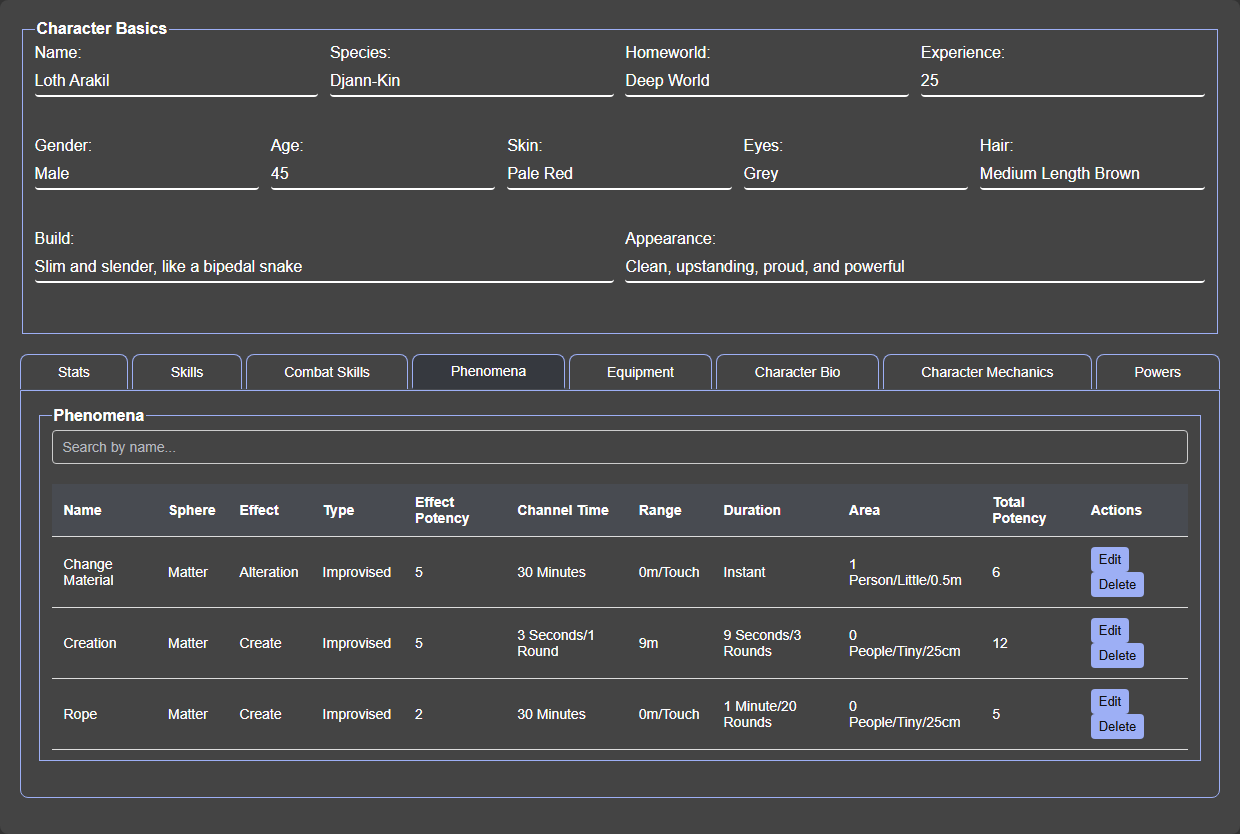
The Phenomenon Builder turns the multi-part process of creating a phenomenon into a guided workflow. Choose a sphere, effect, and potency for each effect. Use Add Effect to combine multiple effects, including repeated effects from the same sphere. Their potencies are added together, with channelling time, range, duration, and the affected target, object, or area applied once to the whole phenomenon. The saved list shows each sphere once and every effect with its own potency. The builder combines those choices to present the manifestation difficulty and expected result. You can create Signature, Known, and Improvised phenomena, edit them as the character develops, search a long collection by name, and remove entries you no longer need.
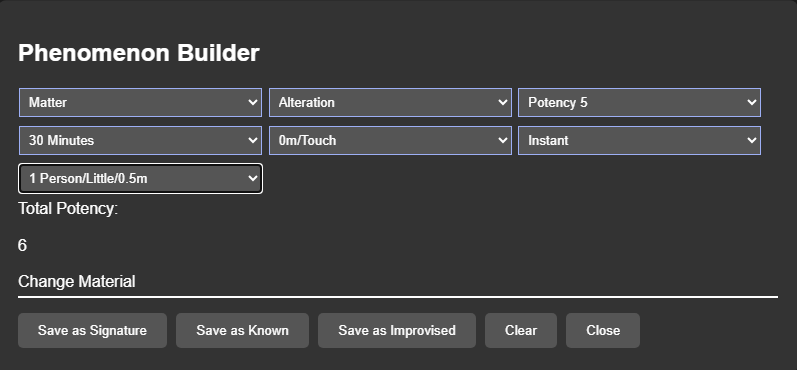
Use a clear, distinctive name and record any narrative or rules reminder that will matter later. For a frequently used phenomenon, review its saved components before the session; for an improvised one, the builder helps everyone see which choices produced its difficulty.

Dice roller and play tips
The built-in dice roller provides d2, d3, d4, d6, and d12 buttons plus custom expressions with numeric modifiers. The result shows the individual rolls and final total, making the outcome easy to verify.
- Update current Health and Sanity when the change happens, not at the end of the session.
- Use miscellaneous modifiers for temporary or exceptional bonuses rather than changing the underlying trait or ranks.
- Collapse finished setup sections during play so the active skills, powers, or phenomenon tools stay close at hand.
- Save after character advancement, after building phenomena, and before closing the page.